Word自動化排版畫圖,Python還能這么玩?
 加入技術(shù)交流群
繼我們上次用Python實(shí)現(xiàn)Excel排版程序之后,我們這次通過使用Python建立Word自動排版程序。其中涉及的知識包括Word表格,字體大小粗細(xì),布局,圖表自動生成和計(jì)算等一件生成。通過程序一鍵計(jì)算Excel中的數(shù)據(jù)生成我們需要的標(biāo)準(zhǔn)Word文件,可以極大程度的減少我們的日常工作量,同時可以節(jié)省我們的時間。而我們相對于多使用Python去編程的原因,也正是因?yàn)镻ython相對簡單容易上手,可以極大的節(jié)省我們的時間。
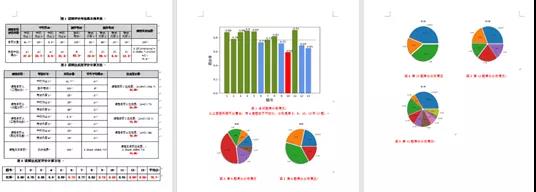
故這次我們將利用Python的一些基本繪圖庫、計(jì)算庫、操作Word庫等庫去實(shí)現(xiàn)我們這次的自動化Word生成程序。最終生產(chǎn)的Word效果如下:
實(shí)驗(yàn)前的準(zhǔn)備
首先我們使用的Python版本是3.6.5所用到的模塊如下:
· xlrd庫,Python操作Excel主要用到xlrd和xlwt這兩個庫,即xlrd是讀Excel,xlwt是寫Excel的庫。
· math模塊用來調(diào)用常見的運(yùn)算函數(shù)。
· matplotlib模塊是 Python的繪圖庫。它可與 NumPy 一起使用,提供了一種有效的 MatLab 開源替代方案。它也可以和圖形工具包一起使用,如PyQt 和wxPython。
· Docx庫即為Python-docx包,這是一個很強(qiáng)大的包,可以用來創(chuàng)建docx文檔,包含段落、分頁符、表格、圖片、標(biāo)題、樣式等幾乎所有的Word文檔中能常用的功能都包含了,這個包的主要功能便是用來創(chuàng)建文檔。
下面我們需要將需要處理的數(shù)據(jù)文件放到同一目錄下,部分文件數(shù)據(jù)如下圖:
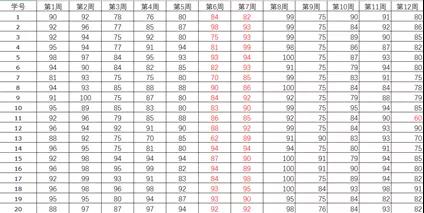
其中需要用到的三個文件分別是2019年期中成績.xlsx、2019上機(jī)械制圖平時成績.xlsx和2019上機(jī)械制圖期末成績.xlsx。
數(shù)值計(jì)算
(1)處理2019上機(jī)械制圖平時成績.xlsx表格數(shù)據(jù):
首先我們需要讀取Excel中的數(shù)據(jù),分別讀取第一列等數(shù)據(jù)。代碼如下:
'''計(jì)算平時成績'''
excel_address="2019上機(jī)械制圖平時成績.xlsx"
workbook = xlrd.open_workbook(excel_address)
sheet1 = workbook.sheet_by_name("Sheet1")
col0 = sheet1.col_values(0) # 獲取第1列內(nèi)容,學(xué)號那一列
col1 = sheet1.col_values(1) # 獲取第2列內(nèi)容
col2 = sheet1.col_values(2) # 獲取第3列內(nèi)容
col3 = sheet1.col_values(3) # 獲取第4列內(nèi)容
col4 = sheet1.col_values(4) # 獲取第5列內(nèi)容
col5 = sheet1.col_values(5) # 獲取第6列內(nèi)容
col6 = sheet1.col_values(6)
col7 = sheet1.col_values(7)
col8 = sheet1.col_values(8)
col9 = sheet1.col_values(9)
col10 = sheet1.col_values(10)
col11 = sheet1.col_values(11)
col12 = sheet1.col_values(12)
然后通過疊加,計(jì)算1-5周的成績總和、6-8周成績總和和第9周、10-12周成績總和,然后求取平均,分別保存為A1、A2、A3、A4變量,代碼如下:
'''疊加,1-5周成績總和,然后平均'''
sum1=0
for i in col1[1:]:
sum1+=i
for i in col2[1:]:
sum1+=i
for i in col3[1:]:
sum1+=i
for i in col4[1:]:
sum1+=i
for i in col5[1:]:
sum1+=i
A1=round((sum1/(len(col1[1:])*5))*41.7/100,1)
'''疊加,6-8周成績總和,然后平均'''
sum2=0
for i in col6[1:]:
sum2+=i
for i in col7[1:]:
sum2+=i
for i in col8[1:]:
sum2+=i
A2=round((sum2/(len(col6[1:])*3))*25/100,1)
'''疊加,9周成績總和,然后平均'''
sum3=0
for i in col9[1:]:
sum3+=i
A3=round((sum3/(len(col9[1:])*1))*8.3/100,1)
'''疊加,10-12周成績總和,然后平均'''
sum4=0
for i in col10[1:]:
sum4+=i
for i in col11[1:]:
sum4+=i
for i in col12[1:]:
sum4+=i
A4=round((sum4/(len(col10[1:])*3))*25/100,1)
(2)處理2019年期中成績.xlsx表格數(shù)據(jù)
同樣是讀取2019年期中成績.xlsx表格中的數(shù)據(jù),然后求平均,作為需要記錄的期中成績:
'''計(jì)算期中成績'''
excel_address="2019年期中成績.xlsx"
workbook = xlrd.open_workbook(excel_address)
sheet2 = workbook.sheet_by_name("Sheet1")
col21 = sheet2.col_values(13) # 獲取第1列內(nèi)容,學(xué)號那一列
sumqi=0
for i in col21[1:]:
sumqi+=i
B = round((sumqi / (len(col21[1:]) * 1)) * 100 / 100, 1)
(3)處理2019上機(jī)械制圖期末成績.xlsx數(shù)據(jù)
通過處理2019上機(jī)械制圖期末成績.xlsx中數(shù)據(jù),計(jì)算期末成績,流程和第一步相似,下面直接給出代碼:
'''計(jì)算期末成績'''
excel_address = "2019上機(jī)械制圖期末成績.xlsx"
workbook = xlrd.open_workbook(excel_address)
sheet3 = workbook.sheet_by_name("Sheet1")
col30 = sheet3.col_values(0) # 獲取第1列內(nèi)容,學(xué)號那一列
col31 = sheet3.col_values(1) # 獲取第2列內(nèi)容
col32 = sheet3.col_values(2) # 獲取第3列內(nèi)容
col33 = sheet3.col_values(3) # 獲取第4列內(nèi)容
col34 = sheet3.col_values(4) # 獲取第5列內(nèi)容
col35 = sheet3.col_values(5) # 獲取第6列內(nèi)容
col36 = sheet3.col_values(6)
col37 = sheet3.col_values(7)
col38 = sheet3.col_values(8)
col39 = sheet3.col_values(9)
col310 = sheet3.col_values(10)
col311 = sheet3.col_values(11)
col312 = sheet3.col_values(12)
col313 = sheet3.col_values(13)
'''疊加,計(jì)算內(nèi)容1(1~3,11題,23分),然后平均'''
sum31 = 0
for i in col31[1:62]:
sum31 += i
for i in col32[1:62]:
sum31 += i
for i in col33[1:62]:
sum31 += i
for i in col311[1:62]:
sum31 += i
C1 = round(sum31 / (len(col31[1:62])), 1)
'''疊加,內(nèi)容2(4~8,12題,48分)),然后平均'''
sum32 = 0
for i in col34[1:62]:
sum32 += i
for i in col35[1:62]:
sum32 += i
for i in col36[1:62]:
sum32 += i
for i in col37[1:62]:
sum32 += i
for i in col38[1:62]:
sum32 += i
for i in col312[1:62]:
sum32 += i
C2 = round(sum32 / (len(col32[1:62])), 1)
'''疊加,內(nèi)容3(9~10題,10分),然后平均'''
sum33 = 0
for i in col39[1:62]:
sum33 += i
for i in col310[1:62]:
sum33 += i
C3 = round(sum33 / (len(col32[1:62])), 1)
'''疊加,內(nèi)容4(第13題,19分),然后平均'''
sum34 = 0
for i in col313[1:62]:
sum34 += i
C4 = round(sum34 / (len(col32[1:62])), 1)
zongping=round(0.25*(A1+A2+A3+A4)+0.05*B+0.7*(C1+C2+C3+C4),1)
(4)計(jì)算A2值,即為計(jì)算平時成績,部分代碼如下
'''計(jì)算平時成績'''
excel_address="2019上機(jī)械制圖期末成績.xlsx"
workbook = xlrd.open_workbook(excel_address)
sheet1 = workbook.sheet_by_name("Sheet1")
jun=[]
sum1=0
for i in col1[1:62]:
sum1+=i
jun1=round(sum1/(len(col1[1:62])*col1[63]),2)
jun.append(jun1)
sum2 = 0
sum11 = 0
for i in col11[1:62]:
sum11 += i
jun11 = round(sum11 / (len(col11[1:62]) * col11[63]), 2)
jun.append(jun11)
sum12 = 0
for i in col12[1:62]:
sum12 += i
jun12 = round(sum12 / (len(col12[1:62]) * col12[63]), 2)
jun.append(jun12)
sum13 = 0
for i in col13[1:62]:
sum13 += i
jun13 = round(sum13 / (len(col13[1:62]) * col13[63]), 2)
jun.append(jun13)
score=jun1*4+jun2*8+jun3*5+jun4*8+jun5*8+jun6*10+jun7*8+jun8*5+jun9*6+jun10*4+jun11*6+jun12*9+jun13*19
score=round(score,1
)
如下圖可見,其為計(jì)算出的數(shù)據(jù):

Word自動排版生成
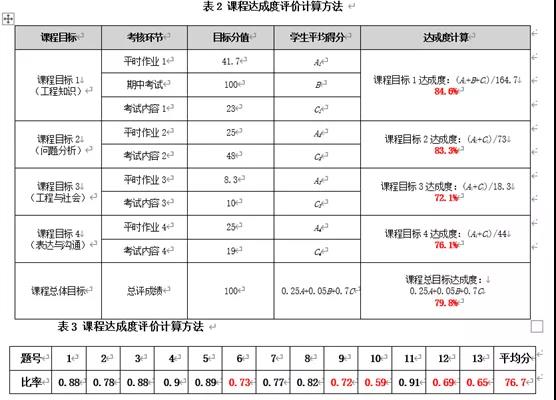
(1)表格繪制:
在計(jì)算好數(shù)據(jù)之后,需要將數(shù)據(jù)建立表格放到其中,其中同時也涉及到了字體加粗、行高布局等設(shè)置,具體代碼有注釋,部分代碼如下圖可見:
#第一個表的繪制
def table1():
# 背景色設(shè)計(jì)
def tabBgColor(table, cols, colorStr):
shading_list = locals()
for i in range(cols):
# shading_list['shading_elm_'+str(i)]= parse_xml(r'<w:shd {}w:fill="{bgColor}"/>'.format(nsdecls('w'),bgColor = colorStr))
table.rows[0].cells[i]._tc.get_or_add_tcPr().append(
parse_xml(r'<w:shd {} w:fill="{bgColor}"/>'.format(nsdecls('w'), bgColor=colorStr)))
table.rows[1].cells[i]._tc.get_or_add_tcPr().append(
parse_xml(r'<w:shd {} w:fill="{bgColor}"/>'.format(nsdecls('w'), bgColor=colorStr)))
document = Document()
document.styles['Normal'].font.name = u'等線 (中文正文)'
# 背景色,根據(jù)需要調(diào)整,可參考站長之家選色http://tool.chinaz.com/Tools/PageColor.aspx
colorStr = '#D3D3D3 '
paragraph =document.add_paragraph()
paragraph.paragraph_format.alignment= WD_ALIGN_PARAGRAPH.CENTER
document.styles['Normal']._element.rPr.rFonts.set(qn('w:eastAsia'), u'等線 (中文正文)')
run = paragraph.add_run('表1 課程評價考核基本信息表 ')
# 加粗
run.font.bold = True
run.font.size =Pt(10.5)
table = document.add_table(rows=4, cols=11, style='Table Grid')
table.alignment =WD_TABLE_ALIGNMENT.CENTER # 設(shè)置表格為居中對齊
table.autofit = False
# 背景顏色設(shè)計(jì)
tabBgColor(table, 11, colorStr)
# 行高
table.rows[0].height = Cm(0.82)
table.rows[1].height = Cm(0.82)
table.rows[2].height = Cm(0.82)
table.rows[3].height = Cm(2)
'''填寫單元格'''
table.cell(0, 0).merge(table.cell(1, 0)) # 合并單元格
table.cell(0, 0).width = Cm(1.8)
table.cell(0, 0).text = "課程目標(biāo)評價內(nèi)容"
table.cell(0, 0).paragraphs[0].runs[0].font.bold = True # 加粗
table.cell(0, 0).paragraphs[0].runs[0].font.size = Pt(9) # 字號大小
table.cell(0, 0).vertical_alignment = WD_ALIGN_VERTICAL.CENTER # 垂直居中
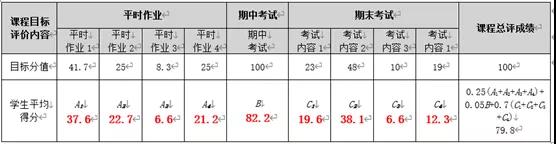
生成的表格如下圖可見:
(2)可視化圖形插入:
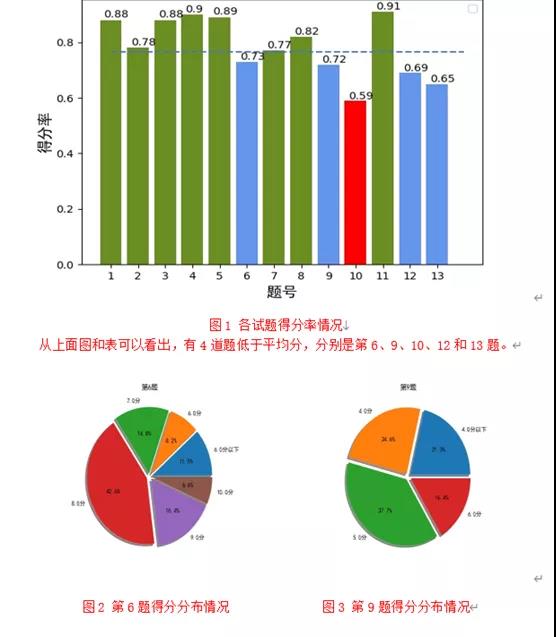
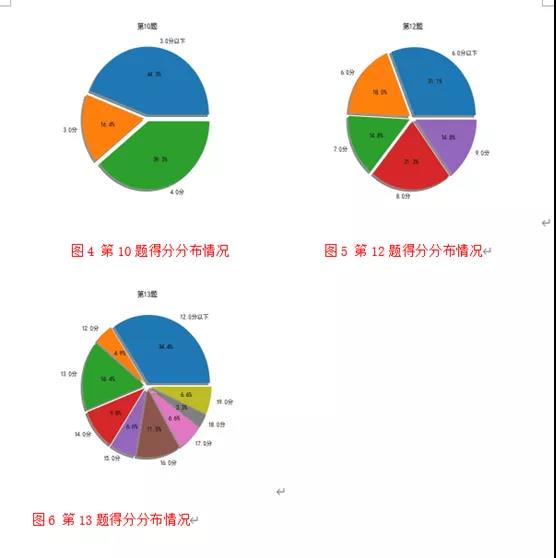
我們需要分別繪制柱狀圖和餅狀圖等插入到word中,部分代碼如下:
import matplotlib.pyplot as plt
from matplotlib.font_manager import FontProperties
import numpy as np
font = FontProperties(fname=r"C:\Windows\Fonts\simhei.ttf", size=14)
jun,score=dels2()
x=[1, 2,3,4,5,6,7,8,9,10,11,12,13]
y=jun
# 定義函數(shù)來顯示柱狀上的數(shù)值
def autolabel(rects):
for rect in rects:
height = rect.get_height()
plt.text(rect.get_x() + rect.get_width() / 2. - 0.25, 1.01 * height, '%s' % float(height))
plt.xticks(np.arange(len(x)), x)
color=[]
for i in jun:
if i*100<score:
color.append('cornflowerblue')
else:
color.append('olivedrab')
color[jun.index(min(jun))]='r'
a = plt.bar(np.arange(len(x)), y, color=color)
autolabel(a)
plt.hlines(score/100, 0, 13, linestyles='--', colors='#4472C4')
plt.legend()
plt.xlabel('題號',FontProperties=font)
plt.ylabel('得分率',FontProperties=font)
plt.savefig("1.jpg")
plt.show()
document = Document('test.docx')
document.styles['Normal'].font.name = u'宋體'
document.add_picture('1.jpg', width=Inches(6.0), height=Inches(4.0))
paragraph = document.add_paragraph()
paragraph.paragraph_format.alignment = WD_ALIGN_PARAGRAPH.CENTER # 居中
document.styles['Normal']._element.rPr.rFonts.set(qn('w:eastAsia'), u'宋體')
run = paragraph.add_run('圖1 各試題得分率情況\n從上面圖和表可以看出,有4道題低于平均分,分別是第6、9、10、12和13題。')
run.font.size = Pt(11)
run.font.color.rgb = red # 數(shù)字部分標(biāo)紅
document.save('test.docx')
源碼地址:
https://pan.baidu.com/s/1kQhDX61CmHytw9YygBKwOw
提取碼:iq5u
*博客內(nèi)容為網(wǎng)友個人發(fā)布,僅代表博主個人觀點(diǎn),如有侵權(quán)請聯(lián)系工作人員刪除。