獨家 | 對抗圖像和攻擊在Keras和TensorFlow上的實現(2)
 加入技術交流群
接下來,讓我們解析下指令參數:
# construct the argument parser and parsethe arguments
ap = argparse.ArgumentParser()
ap.add_argument("-i", "--image",required=True,
help="pathto input image")
args = vars(ap.parse_args())
我們在這里只需要一個命令行參數,--image,即輸入圖像存放在硬盤上的路徑。
如果你從來沒有處理過命令行參數和argparse ,我建議你看一下這篇教程。
接下來讓載入輸入圖像并進行預處理:
# load image fromdisk and make a clone for annotation
print("[INFO] loadingimage...")
image = cv2.imread(args["image"])
output = image.copy()
# preprocess the input image
output = imutils.resize(output, width=400)
preprocessedImage = preprocess_image(image)
通過調用cv2.imread來載入輸入圖片。在第4行對這張圖片進行了復制,以便后期在輸出結果上面畫框并標注上預測結果類別標簽。
我們調整下輸出圖片的尺寸,讓它的寬變為400像素,這樣可以適配我們的電腦屏幕。在這里同樣使用preprocess_image函數將其處理為可用于ResNet進行分類的輸入圖片。
加上我們預處理好的圖片,接著載入ResNet并對圖片進行分類:
# load thepre-trained ResNet50 model
print("[INFO] loadingpre-trained ResNet50 model...")
model = ResNet50(weights="imagenet")
# makepredictions on the input image and parse the top-3 predictions
print("[INFO] makingpredictions...")
predictions =model.predict(preprocessedImage)
predictions = decode_predictions(predictions, top=3)[0]
第3行,載入ResNet和該模型用ImageNet數據集預訓練好的權重。
第6和7行,針對預處理好的圖片進行預測,然后再用 Keras/TensorFlow 中的decode_predictions輔助函數對圖片進行解碼。
現在讓我們看看神經網絡預測的Top 3 (置信度前三)類別以及所展示的類別標簽:
# loop over thetop three predictions
for(i, (imagenetID, label,prob))inenumerate(predictions):
# print the ImageNet class label ID of the top prediction to our
# terminal (we'll need thislabel for our next script which will
# perform the actual adversarial attack)
if i == 0:
print("[INFO] {} => {}".format(label, get_class_idx(label)))
# display the prediction to our screen
print("[INFO] {}.{}: {:.2f}%".format(i + 1, label, prob * 100))
第2行開始循環Top-3預測結果。
如果這是第一個預測結果(即Top-1預測結果),在輸出終端顯示可讀的標簽,然后利用 get_class_idx函數找出該標簽對應的ImageNet的整數值索引。
還可以在終端上展示Top-3的標簽和對應的概率值。
最終一步就是將Top-1預測結果標注在輸出圖片中:
# draw thetop-most predicted label on the image along with the
# confidence score
text = "{}:{:.2f}%".format(predictions[0][1],
predictions[0][2] * 100)
cv2.putText(output, text, (3, 20),cv2.FONT_HERSHEY_SIMPLEX, 0.8,
(0, 255, 0), 2)
# show the output image
cv2.imshow("Output", output)
cv2.waitKey(0)
輸出圖像在終端顯示,如果你單擊OpenCV窗口或按下任意鍵,輸出圖像將會關閉。
非對抗圖像的分類結果
現在可以用ResNet來執行基本的圖像分類(非對抗攻擊)了。
首先在“下載“頁獲取源代碼和圖像范例。
從這開始,打開一個終端并執行以下命令:
$ pythonpredict_normal.py --image pig.jpg
[INFO] loading image...
[INFO] loadingpre-trained ResNet50 model...
[INFO] making predictions...
[INFO] hog => 341
[INFO] 1. hog: 99.97%
[INFO] 2.wild_boar: 0.03%
[INFO] 3. piggy_bank: 0.00%
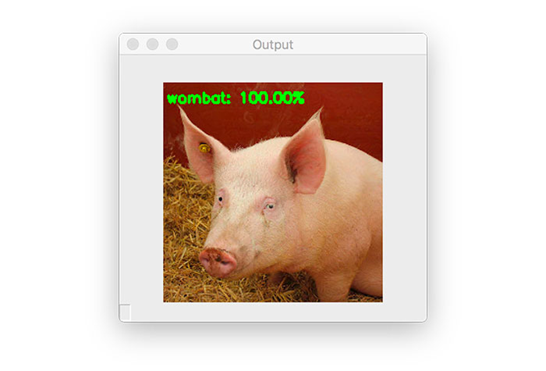
圖五:預訓練好的ResNet模型可以正確地將這張圖片分類為“豬(hog)”。
在這里你可以看到我們將一張豬的圖片進行了分類,置信度為99.97%。
另外,這里還加上了hog標簽的ID(341)。我們將會在下一章用到這個標簽ID,我們會針對這張豬的輸入圖片進行一次對抗攻擊。
在Keras和TensorFlow上實現對抗圖像和對抗攻擊
接下來就要學習如何在Keras和TensorFlow上實現對抗圖像和對抗攻擊。
打開generate_basic_adversary.py文件,插入以下代碼:
# import necessary packages
from tensorflow.keras.optimizers import Adam
from tensorflow.keras.applications import ResNet50
from tensorflow.keras.losses importSparseCategoricalCrossentropy
from tensorflow.keras.applications.resnet50 import decode_predictions
from tensorflow.keras.applications.resnet50 import preprocess_input
import tensorflow as tf
import numpy as np
import argparse
import cv2
在第2-10行中引入我們所需的Python包。你會注意到我們再次用到了ResNet50 架構,以及對應的preprocess_input函數(用于預處理/縮放輸入圖像)和 decode_predictions用于解碼預測輸出和顯示可讀的ImageNet標簽。
SparseCategoricalCrossentropy 用于計算標簽和預測值之間的分類交叉熵損失。利用稀疏版本的分類交叉熵,我們不需要像使用scikit-learn的LabelBinarizer或者Keras/TensorFlow的to_categorical功能一樣用one-hot對類標簽編碼。
例如在predict_normal.py腳本中有preprocess_image 功能,我們在這個腳本上同樣需要:
defpreprocess_image(image):
# swap color channels, resizethe input image, and add a batch
# dimension
image = cv2.cvtColor(image,cv2.COLOR_BGR2RGB)
image = cv2.resize(image, (224, 224))
image = np.expand_dims(image, axis=0)
# return the preprocessedimage
return image
除了省略了調用preprocess_input函數,這一段代碼與上一段代碼相同,當我們開始創建對抗圖像時,你們馬上就會明白為什么省去調用這一函數。
接下來,我們有一個簡單的輔助程序,clip_eps:
defclip_eps(tensor, eps):
# clip the values of thetensor to a given range and return it
return tf.clip_by_value(tensor,clip_value_min=-eps,
clip_value_max=eps)
這個函數的目的就是接受一個輸入張量tensor,然后在范圍值 [-eps, eps]內對輸入進行截取。
被截取后的tensor會被返回到調用函數。
接下來看看generate_adversaries 函數,這是對抗攻擊的靈魂:
defgenerate_adversaries(model, baseImage,delta, classIdx, steps=50):
# iterate over the number ofsteps
for step inrange(0, steps):
# record our gradients
with tf.GradientTape()as tape:
# explicitly indicate thatour perturbation vector should
# be tracked for gradient updates
tape.watch(delta)
generate_adversaries 方法是整個腳本的核心。這個函數接收四個必需的參數,以及第五個可選參數:
model:ResNet50模型(如果你愿意,你可以換成其他預訓練好的模型,例如VGG16,MobileNet等等);
baseImage:原本沒有被干擾的輸入圖像,我們有意針對這張圖像創建對抗攻擊,導致model參數對它進行錯誤的分類。
delta:噪聲向量,將會被加入到baseImage中,最終導致錯誤分類。我們將會用梯度下降均值來更新這個delta 向量。
classIdx:通過predict_normal.py腳本所獲得的類別標簽整數值索引。
steps:梯度下降執行的步數(默認為50步)。
第3行開始循環設定好的步數。
接下來用GradientTape來記錄梯度。在tape上調用 .watch方法指出擾動向量是可以用來追蹤更新的。
現在可以建造對抗圖像了:
# add our perturbation vector to the base image and
# preprocess the resulting image
adversary = preprocess_input(baseImage + delta)
# run this newly constructed image tensor through our
# model and calculate theloss with respect to the
# *original* class index
predictions = model(adversary,training=False)
loss = -sccLoss(tf.convert_to_tensor([classIdx]),
predictions)
# check to see if we arelogging the loss value, and if
# so, display it to our terminal
if step % 5 == 0:
print("step: {},loss: {}...".format(step,
loss.numpy()))
# calculate the gradients ofloss with respect to the
# perturbation vector
gradients = tape.gradient(loss, delta)
# update the weights, clipthe perturbation vector, and
# update its value
optimizer.apply_gradients([(gradients, delta)])
delta.assign_add(clip_eps(delta, eps=EPS))
# return the perturbationvector
return delta
第3行將delta擾動向量加入至baseImage的方式來組建對抗圖片,所得到的結果將放入ResNet50的preprocess_input函數中來進行比例縮放和結果對抗圖像進行歸一化。
接下來幾行的意義是:
第7行用model參數導入的模型對新創建的對抗圖像進行預測。
第8和9行針對原有的classIdx(通過運行predict_normal.py得到的top-1 ImageNet類別標簽整數值索引)計算損失。
第12-14行表示每5步就顯示一次損失值。
第17行,在with聲明外根據擾動向量計算梯度損失。
接著,可以更新delta向量,截取掉超出 [-EPS,EPS] 范圍外的值。
最終,把得到的擾動向量返回至調用函數——即最終的delta值,該值能讓我們建立用來欺騙模型的對抗攻擊。
在對抗腳本的核心實現后,接下來就是解析命令行參數:
# construct the argumentparser and parse the arguments
ap = argparse.ArgumentParser()
ap.add_argument("-i", "--input", required=True,
help="path tooriginal input image")
ap.add_argument("-o", "--output", required=True,
help="path tooutput adversarial image")
ap.add_argument("-c", "--class-idx", type=int,required=True,
help="ImageNetclass ID of the predicted label")
args = vars(ap.parse_args())
我們的對抗攻擊Python腳本需要三個指令行參數:
--input: 輸入圖像的磁盤路徑(例如pig.jpg);
--output: 在構建進攻后的對抗圖像輸出(例如adversarial.png);
--class-idex:ImageNet數據集中的類別標簽整數值索引。我們可以通過執行在“非對抗圖像的分類結果”章節中提到的predict_normal.py來獲得這一索引。
接下來是幾個變量的初始化,以及加載/預處理--input圖像:
# define theepsilon and learning rate constants
EPS = 2 / 255.0
LR = 0.1
# load the inputimage from disk and preprocess it
print("[INFO] loadingimage...")
image = cv2.imread(args["input"])
image = preprocess_image(image)
第2行定義了用于在構建對抗圖像時來裁剪tensor的epsilon值(EPS)。2 / 255.0 是EPS的一個用于對抗類刊物或教程的標準值和指導值(如果你想要了解更多的默認值,你可以參考這份指導)。
在第3行定義了學習速率。經驗之談,LR的初始值一般設為0.1,在創建你自己的對抗圖像時可能需要調整這個值。
最后兩行載入輸入圖像,利用preprocess_image輔助函數來對其進行預處理。
接下來,可以載入ResNet模型:
# load thepre-trained ResNet50 model for running inference
print("[INFO] loadingpre-trained ResNet50 model...")
model = ResNet50(weights="imagenet")
# initializeoptimizer and loss function
optimizer = Adam(learning_rate=LR)
sccLoss = SparseCategoricalCrossentropy()
第3行載入在ImageNet數據集上訓練好的ResNet50模型。
我們將會用到Adam優化器,以及稀疏的分類損失用于更新我們的擾動向量。
讓我們來構建對抗圖像:
# create a tensorbased off the input image and initialize the
# perturbation vector (we will update this vector via training)
baseImage = tf.constant(image,dtype=tf.float32)
delta = tf.Variable(tf.zeros_like(baseImage), trainable=True)
# generate the perturbation vector to create an adversarialexample
print("[INFO]generating perturbation...")
deltaUpdated = generate_adversaries(model, baseImage,delta,
args["class_idx"])
# create theadversarial example, swap color channels, and save the
# output image to disk
print("[INFO]creating adversarial example...")
adverImage = (baseImage +deltaUpdated).numpy().squeeze()
adverImage = np.clip(adverImage, 0, 255).astype("uint8")
adverImage = cv2.cvtColor(adverImage,cv2.COLOR_RGB2BGR)
cv2.imwrite(args["output"], adverImage)
第3行根據輸入圖像構建了一個tensor,第4行初始化擾動向量delta。
我們可以把ResNet50、輸入圖像、初始化后的擾動向量、及類標簽整數值索引作為參數,用來調用generate_adversaries并更新delta向量。
在 generate_adversaries函數執行時,會一直更新delta擾動向量,生成最終的噪聲向量deltaUpdated。
在倒數第4行,在baseImage上加入deltaUpdated 向量,就生成了最終的對抗圖像(adverImage)。
然后,對生成的對抗圖像進行以下三步后處理:
將超出[0,255] 范圍的值裁剪掉;
將圖片轉化成一個無符號8-bit(unsigned 8-bit)整數(這樣OpenCV才能對圖片進行處理);
將通道順序從RGB轉換成BGR。
在經過這些處理步驟后,就可以把對抗圖像寫入到硬盤里了。
真正的問題來了,我們新創建的對抗圖像能夠欺騙我們的ResNet模型嗎?
下一段代碼就可以回答這一問題:
# run inferencewith this adversarial example, parse the results,
# and display the top-1 predicted result
print("[INFO]running inference on the adversarial example...")
preprocessedImage = preprocess_input(baseImage +deltaUpdated)
predictions =model.predict(preprocessedImage)
predictions = decode_predictions(predictions, top=3)[0]
label = predictions[0][1]
confidence = predictions[0][2] * 100
print("[INFO] label:{} confidence: {:.2f}%".format(label,
confidence))
# draw the top-most predicted label on the adversarial imagealong
# with theconfidence score
text = "{}: {:.2f}%".format(label, confidence)
cv2.putText(adverImage, text, (3, 20),cv2.FONT_HERSHEY_SIMPLEX, 0.5,
(0, 255, 0), 2)
# show the output image
cv2.imshow("Output", adverImage)
cv2.waitKey(0)
在第4行又一次創建了一個對抗圖像,方式還是在原始輸入圖像中加入delta噪聲向量,但這次我們利用ResNet的preprocess_input功能來處理。
生成的預處理圖像進入到ResNet,然后會得到top-3預測結果并對他們進行解碼(第5和6行)。
接著我們獲取到top-1標簽和對應的概率/置信度,并將這些值顯示在終端上(第7-10行)。
最后一步就是把最高的預測值標在輸出的對抗圖像上,并展示在屏幕上。
對抗圖像和攻擊的結果
準備好見證一次對抗攻擊了嗎?
從這里開始,你就可以打開終端并執行下列代碼了:
$ python generate_basic_adversary.py --inputpig.jpg --output adversarial.png --class-idx 341
[INFO] loading image...
[INFO] loading pre-trained ResNet50 model...
[INFO] generatingperturbation...
step: 0, loss:-0.0004124982515349984...
step: 5, loss:-0.0010656398953869939...
step: 10, loss:-0.005332294851541519...
step: 15, loss: -0.06327803432941437...
step: 20, loss: -0.7707189321517944...
step: 25, loss: -3.4659299850463867...
step: 30, loss: -7.515471935272217...
step: 35, loss: -13.503922462463379...
step: 40, loss: -16.118188858032227...
step: 45, loss: -16.118192672729492...
[INFO] creating adversarial example...
[INFO] running inference on theadversarial example...
[INFO] label: wombat confidence: 100.00%
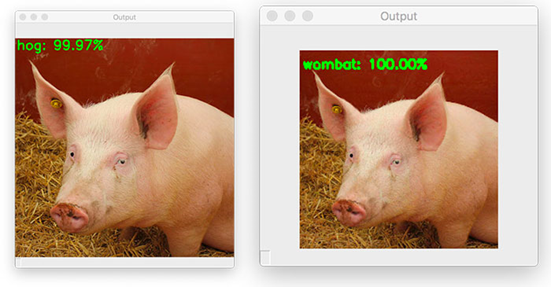
圖六:之前,這張輸入圖片被正確地分在了“豬(hog)”類別中,但現在因為對抗攻擊而被分在了“袋熊(wombat)”類別里!
我們的輸入圖片 pig.jpg 之前被正確地分在了“豬(hog)”類別中,但現在它的標簽卻成為了“袋熊(wombat)”!
將原始圖片和用generate_basic_adversary.py腳本生成的對抗圖片放在一起進行對比:
圖片
圖七:在左邊是原始圖片,分類結果正確。右邊將是對抗圖片,被錯誤地分在了“袋熊(wombat)”類別中。而對于人類的眼睛來看完全分辨不出兩張圖片的有什么區別。
左邊是最初豬的圖像,在右邊是輸出的對抗圖像,這張圖像被錯誤的分在了“袋熊(wombat)”類別。
就像你看到的一樣,這兩張圖片沒有任何可感知的差別,我們人類的眼睛看不出任何區別,但對于ResNet來說確實完全不同的。
這很好,但我們無法清晰地掌控對抗圖像被最終識別的類別標簽。這會引起以下問題:
我們有可能掌控輸入圖片的最終類別標簽嗎?答案是肯定的,這會成為我下一篇教程的主題。
總結來說,對抗圖像和對抗攻擊真的是令人細思極恐。但如果等我們看到下一篇教程,就可以提前防御這種類型的進攻。稍后再詳細說明下。
致謝
如果沒有Goodfellow, Szegedy和其他深度學習的研究者的工作,這篇教程就無法完成。
另外,這篇教程所用到的實現代碼靈感來自于TensorFlow官方實現的《Fast Gradient Signed Method》。我強烈建議你去看看其他的示例,每一段代碼都比這篇教程中的在理論和數學上更加明確。
總結
在這篇教程中,你學到關于對抗攻擊的知識,關于他們是怎樣工作的,以及隨著人工智能和深度神經網絡與這個世界的關聯越來越高,對抗攻擊就會構成更大的威脅。
接著我們利用深度學習庫Keras 和TensorFlow實現了基本的對抗攻擊算法。
利用對抗攻擊,我們可以蓄意擾亂一張輸入圖片,例如:
1、這張輸入圖片會被錯誤分類。
2、然而,肉眼看上去被擾亂的圖片還是和之前一樣。
利用這篇教程所使用的方法,我們并不能控制圖片最終被判別的類別標簽——我們所做的只是創造一個噪聲向量,并將其嵌入到輸入圖像中,導致深度神經網絡對其錯誤分類。
如果我們能夠控制最終的類別標簽會怎樣呢?比如說,我們拿一張“狗”的圖片,然后制造一次對抗攻擊,讓卷積神經網絡認為這是一張“貓”的圖片,這有沒有可能呢?
答案是肯定的——我們會在下一篇教程中來談論這一話題。
原文鏈接:
https://www.pyimagesearch.com/2020/10/19/adversarial-images-and-attacks-with-keras-and-tensorflow/
原文標題:
Adversarial images andattacks with Keras and TensorFlow
*博客內容為網友個人發布,僅代表博主個人觀點,如有侵權請聯系工作人員刪除。