征程 6E/M|多 camera 場景示例
 加入技術交流群
1. 功能概述
1.1. 軟件架構說明
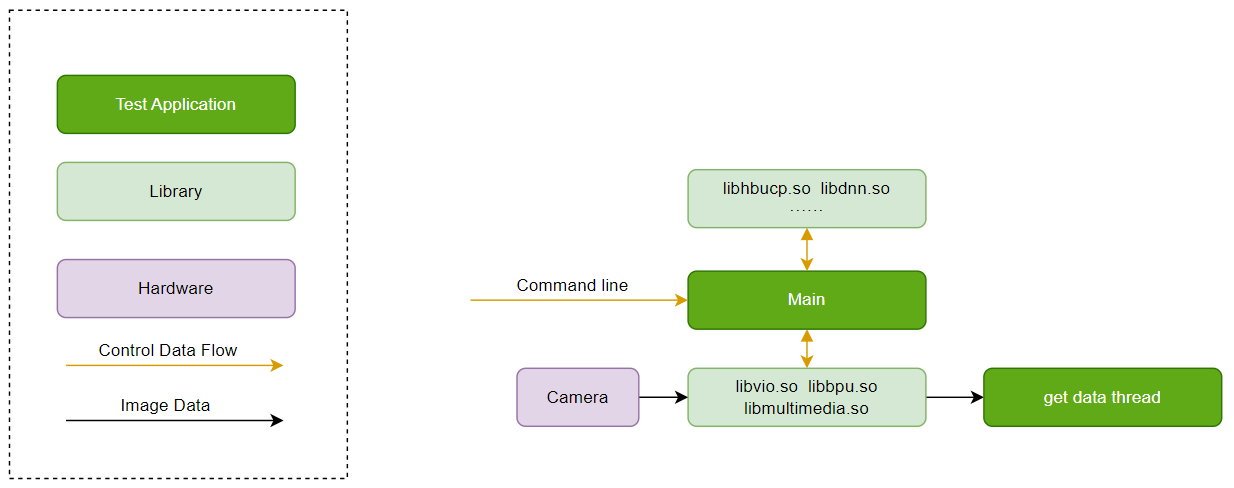
1.2. 硬件數據流說明
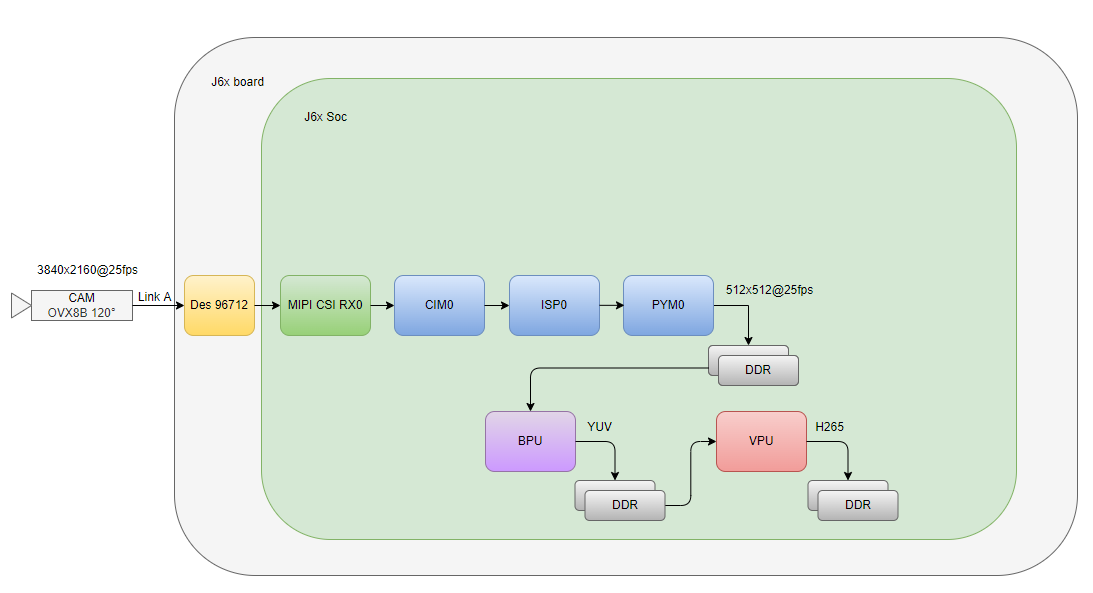
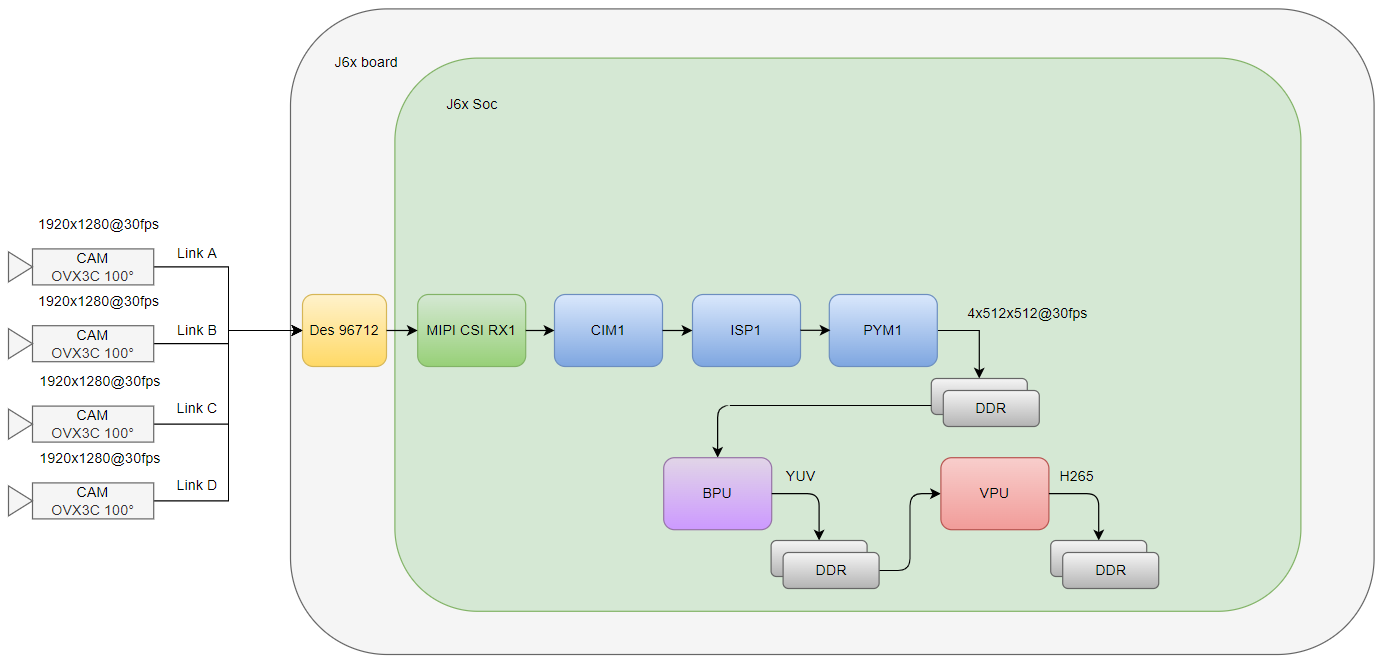
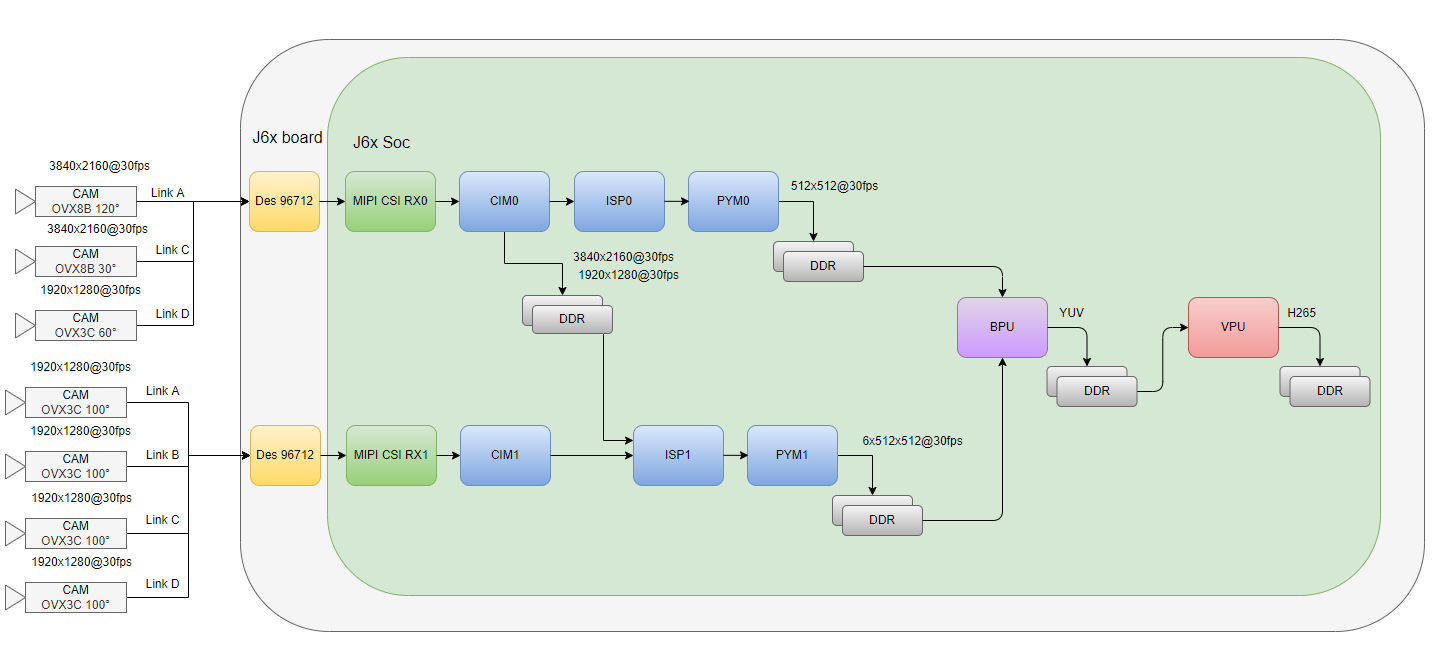
1.3. 代碼位置及目錄結構
vio_full_link_sample/
    ├── Kconfig
    ├── Makefile
    ├── Makefile.in
    ├── cfg                              # JSON files
    ├── lib                              # dynamic libraries
    |   ├── libhbucp.so
    |   └── ...
    ├── res
    |   └── fcos.hbm                     # model hbm file
    └── src
        ├── include
        ├── utils                        # utility codes
        |   ├── bpu_dnn.cpp
        |   ├── codec_venc.c
        |   └── ...
        ├── vio_full_link_sample.c       # core code
        ├── run_vio_full_link_sample.sh  # sample execution script
        ├── run_vio_full_link_sample_4V.sh  # sample execution script
        ├── run_vio_full_link_sample_7V.sh  # sample execution script
        └── Makefile
1.4. API 流程說明
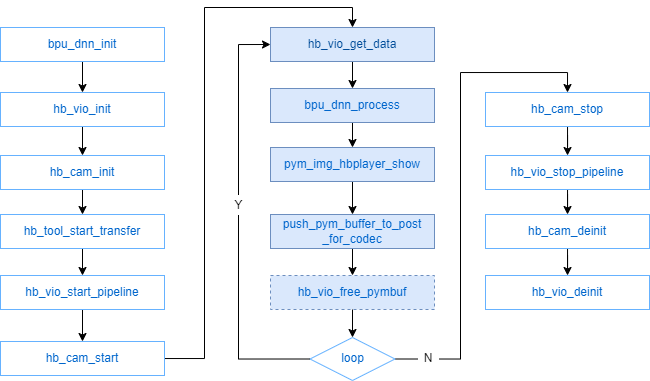
int main(int argc, char *argv[])
{
    int ret = 0;
    pthread_t thid[HB_VIO_PIPELINE_MAX];
    uint32_t pipe_id[HB_VIO_PIPELINE_MAX];

    signal(SIGINT, get_exit_signal);

    // get opts
    ret = get_opts_for_vio(argc, argv);
    if (ret < 0) {
        vio_print_err("get opts err!\n");
        return -1;
    }

#ifdef ENABLE_BPU
    ret = bpu_dnn_init(g_bpu_hbm);
    if (ret < 0) {
        vio_print_err("bpu_hbm_init\n");
        goto err;
    }
#endif

    ret = hb_vio_init(g_vpm_config);
    if (ret < 0) {
        vio_print_err("hb_vio_init\n");
        goto err;
    }

    ret = hb_cam_init(0, g_cam_config);
    if (ret < 0) {
        hb_vio_deinit();
        vio_print_err("hb_cam_init\n");
        goto err;
    }

#ifdef ENABLE_HBPLAYER
    vio_full_link_sample_event = hb_tool_start_transfer(0);
    if (vio_full_link_sample_event != NULL) {
       hb_tool_event_setcb(vio_full_link_sample_event, NULL, NULL, NULL, NULL, NULL);
    } else {
       vio_print_err("vio_full_link_sample_event is NULL\n");
       ret = -1;
       goto err;
    }
#endif

    start_timer();
    for (uint32_t id = 0; id < HB_VIO_PIPELINE_MAX; id++) {
        if (((g_port_mask >> id) & 0x0001) == 0)
           continue;

           ret = hb_vio_start_pipeline(id);
           if (ret < 0) {
              hb_cam_deinit(0);
              hb_vio_deinit();
              vio_print_err("hb_vio_start_pipeline");
              goto err;
           }
           else {
               vio_print_info("hb_vio_start_pipeline done");
           }
           ret = hb_cam_start(id);
           if (ret < 0) {
               hb_vio_stop_pipeline(id);
               hb_cam_deinit(0);
               hb_vio_deinit();
               vio_print_err("hb_cam_start");
               goto err;
           }
           pipe_id[id] = id;
#ifdef ENABLE_MULTI_MEDIA
           ret = pthread_create(&codec_thid[id], NULL, codec_encoding,
                    (void *)(&pipe_id[id]));
           vio_print_dbg("pipe(%d)Test encode work thread---running.\n", id);
#endif

           ret = pthread_create(&thid[id], NULL, vio_worker_thread,
                       (void *)(&pipe_id[id]));

           vio_print_dbg("pipe(%d)Test vio work thread---running.\n", id);
}

sleep(1);

for (uint32_t id = 0; id < HB_VIO_PIPELINE_MAX; id++) {
     if (((g_port_mask >> id) & 0x0001) == 0)
        continue;
     vio_print_dbg("pipe(%d)Test vio work thread---try stop.\n", id);
}

for (uint32_t id = 0; id < HB_VIO_PIPELINE_MAX; id++) {
    if (((g_port_mask >> id) & 0x0001) == 0)
        continue;
    pthread_join(thid[id], NULL);
    vio_print_dbg("pipe(%d)Test vio work thread---join done.\n", id);
}

for (uint32_t id = 0; id < HB_VIO_PIPELINE_MAX; id++) {
    if (((g_port_mask >> id) & 0x0001) == 0)
       continue;

    ret = hb_cam_stop(id);
    if (ret < 0) {
        hb_vio_stop_pipeline(id);
        hb_cam_deinit(0);
        hb_vio_deinit();
        vio_print_err("hb_cam_stop");
        goto err;
    }
    ret = hb_vio_stop_pipeline(id);
    if (ret < 0) {
        hb_cam_deinit(0);
        hb_vio_deinit();
        vio_print_err("hb_vio_stop_pipeline");
        goto err;
    }
    }

#ifdef ENABLE_MULTI_MEDIA
    for (uint32_t id = 0; id < HB_VIO_PIPELINE_MAX; id++) {
        if (((g_port_mask >> id) & 0x0001) == 0)
           continue;
        pthread_join(codec_thid[id], NULL);
        vio_print_dbg("pipe(%d)Test encode work thread---join done.\n", id);
    }

#endif

#ifdef ENABLE_BPU
   bpu_dnn_deinit();
#endif

   ret = hb_cam_deinit(0);
   ret |= hb_vio_deinit();

err:
    return ret;
} int vio_worker_func(uint32_t pipe_id, int loop_count)
{
int ret = 0;
pym_buffer_v3_t pym_buf;
VIO_DATA_TYPE_E pym_data_type;
pym_data_type = HB_VIO_PYM_DATA_V3;
dp_info_t dump_info = {0};
ret = hb_vio_get_data(pipe_id, pym_data_type, &pym_buf);
if (ret < 0) {
vio_print_err("Pipe(%u) HB_VIO_PYM_ADV_DATA get failed\n", pipe_id);
goto err;
}
#ifdef ENABLE_BPU
if (((g_bpu_enable_mask >> pipe_id) & 0x0001) != 0) {
address_info_t img_info_bpu;
memset(&img_info_bpu, 0, sizeof(address_info_t));
ret = pym_layer_img_info_attach(&pym_buf, (PYM_LAYER_TYPE)g_pym_show_layer, &img_info_bpu);
if (ret < 0) {
vio_print_err("pipe(%u)pym frame%d buf%d attch failed.\n", pipe_id, pym_buf.pym_img_info.frame_id,
pym_buf.pym_img_info.buf_index);
goto err;
}
pthread_mutex_lock(&g_pym_lock);
bpu_dnn_process(pipe_id, img_info_bpu.addr[0], img_info_bpu.width, img_info_bpu.height);
pthread_mutex_unlock(&g_pym_lock);
//vio_print_info("pipe(%u) bpu process done\n", pipe_id);
}
#endif
#ifdef ENABLE_HBPLAYER
if (g_pym_show_layer >= PYM_DS0_DATA && g_pym_show_layer < PYM_INVAILD_DATA) { pym_img_hbplayer_show((void *)vio_full_link_sample_event, &pym_buf, (PYM_LAYER_TYPE)g_pym_show_layer);
}
#endif
if (g_pym_save >= loop_count) {
//worker thread dump
dump_info.pipe_id = pipe_id;
dump_info.enable = PYM_BUF_DUMP;
memcpy(&dump_info.pym_buf, &pym_buf, sizeof(pym_buffer_v3_t)); dp_worker_data_process(&dump_info);
}
#ifdef ENABLE_MULTI_MEDIA
if (g_codec_save >= loop_count) {
push_pym_buffer_to_post_for_codec(pipe_id, &pym_buf, FALSE);
if (g_codec_save == loop_count) {
// if last frame, push an empty frame more.
push_pym_buffer_to_post_for_codec(pipe_id, NULL, TRUE);
}
} else {
ret = hb_vio_free_pymbuf(pipe_id, pym_data_type, &pym_buf);
if (ret < 0) {
vio_print_err("pipe(%u)pym frame%d buf%d free failed.\n", pipe_id, pym_buf.pym_img_info.frame_id,
pym_buf.pym_img_info.buf_index);
goto err;
}
}#else
ret = hb_vio_free_pymbuf(pipe_id, pym_data_type, &pym_buf);
if (ret < 0) {
vio_print_err("pipe(%u)pym frame%d buf%d free failed.\n", pipe_id, pym_buf.pym_img_info.frame_id,
pym_buf.pym_img_info.buf_index);
goto err;
}
#endif
err:
eturn ret;
}二. 編譯
2.1. 編譯環境
2.2. 編譯說明
#include "hb_vin_data_info.h"
#include "hb_vpm_data_info.h"
#include "hb_vio_interface.h"
#include "base/algorithm.h"
#include "base/perception_common.h"
#include "hobot/dnn/hb_dnn.h"
#include "hobot/hb_ucp.h"
#include "hobot/hb_ucp_sys.h"
#include "hb_media_codec.h"
#include "hb_media_error.h"
#include
#include
#include "buf_queue.h"
#include "hb_tool_server.h"
LIBS += -lvio -lpthread -lalog -lhbmem
LIBS += -lbpu -ldnn -lopencv_world -lhlog -lhbucp
LIBS += -lmultimedia -lavformat -lavcodec -lavutil -lswresample
LIBS += -lhbplayer
進入SDK所在目錄{sdk_dir},并source構建環境(參見上)。
# 編譯本sample:
bdm libvio-full-link-sample
# 輸出文件:{sdk_dir}/out/debug-gcc_{gcc_version}/build/test/samples/platform_samples/source/S83_Sample/S83E06_Tros/vio_full_link_sample
三. 運行
3.1. 支持平臺
3.2. 硬件環境搭建
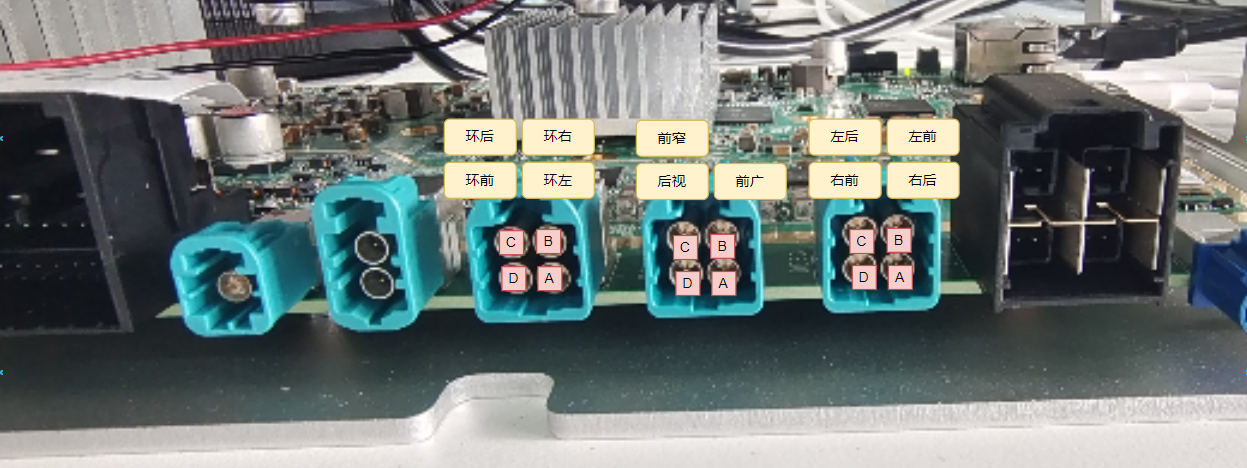
3.3. 板端部署及配置
需要用到的配置文件位于板端: /app/sample/S83_Sample/S83E06_Tros/vio_full_link_sample/cfg/;
需要用到的資源文件位于板端: /app/sample/S83_Sample/S83E06_Tros/vio_full_link_sample/res/;
需要用到的第三方庫位于板端: /app/sample/S83_Sample/S83E06_Tros/vio_full_link_sample/lib/;
3.4. 運行指南
3.4.1. 運行方法
bash /app/sample/S83_Sample/S83E06_Tros/vio_full_link_sample/bin/run_vio_full_link_sample.sh
export LD_LIBRARY_PATH=/app/sample/S83_Sample/S83E06_Tros/vio_full_link_sample/lib:$LD_LIBRARY_PATH
/app/sample/S83_Sample/S83E06_Tros/vio_full_link_sample/bin/vio_full_link_sample \
-v /app/sample/S83_Sample/S83E06_Tros/vio_full_link_sample/cfg/Scenario_1V_cpe0_sen_cim0_isp0_pym0_mode2_sample/vpm_config.json \
-c /app/sample/S83_Sample/S83E06_Tros/vio_full_link_sample/cfg/case_matrix/1V_OVX8B_RX0/hb_j6dev.json \
-O /app/sample/S83_Sample/S83E06_Tros/vio_full_link_sample/res/fcos.hbm -m 1 -o 1 -j 1 -l 1000 -s 10 -f 100 -e 0
bash /app/sample/S83_Sample/S83E06_Tros/vio_full_link_sample/bin/run_vio_full_link_sample_4V.sh
export LD_LIBRARY_PATH=/app/sample/S83_Sample/S83E06_Tros/vio_full_link_sample/lib:$LD_LIBRARY_PATH
/app/sample/S83_Sample/S83E06_Tros/vio_full_link_sample/bin/vio_full_link_sample \
-v /app/sample/S83_Sample/S83E06_Tros/vio_full_link_sample/cfg/Scenario_4V_cpe1_sen_cim1_isp1_pym1_mode1_sample/vpm_config.json \
-c /app/sample/S83_Sample/S83E06_Tros/vio_full_link_sample/cfg/Scenario_4V_cpe1_sen_cim1_isp1_pym1_mode1_sample/hb_j6dev.json \
-O /app/sample/S83_Sample/S83E06_Tros/vio_full_link_sample/res/fcos.hbm -m 15 -o 15 -j 15 -l 1000 -s 10 -f 10 -e 0
bash /app/sample/S83_Sample/S83E06_Tros/vio_full_link_sample/bin/run_vio_full_link_sample_7V.sh
export LD_LIBRARY_PATH=/app/sample/S83_Sample/S83E06_Tros/vio_full_link_sample/lib:$LD_LIBRARY_PATH
/app/sample/S83_Sample/S83E06_Tros/vio_full_link_sample/bin/vio_full_link_sample \
-v /app/sample/S83_Sample/S83E06_Tros/vio_full_link_sample/cfg/Scenario_7V_cpe01_sen_cim01_isp01_pym01_sample/vpm_config.json \
-c /app/sample/S83_Sample/S83E06_Tros/vio_full_link_sample/cfg/Scenario_7V_cpe01_sen_cim01_isp01_pym01_sample/hb_j6dev.json \
-O /app/sample/S83_Sample/S83E06_Tros/vio_full_link_sample/res/fcos.hbm -m 254 -o 254 -j 254 -l 1000 -s 10 -f 10 -e 0
3.4.2. 運行命令行說明
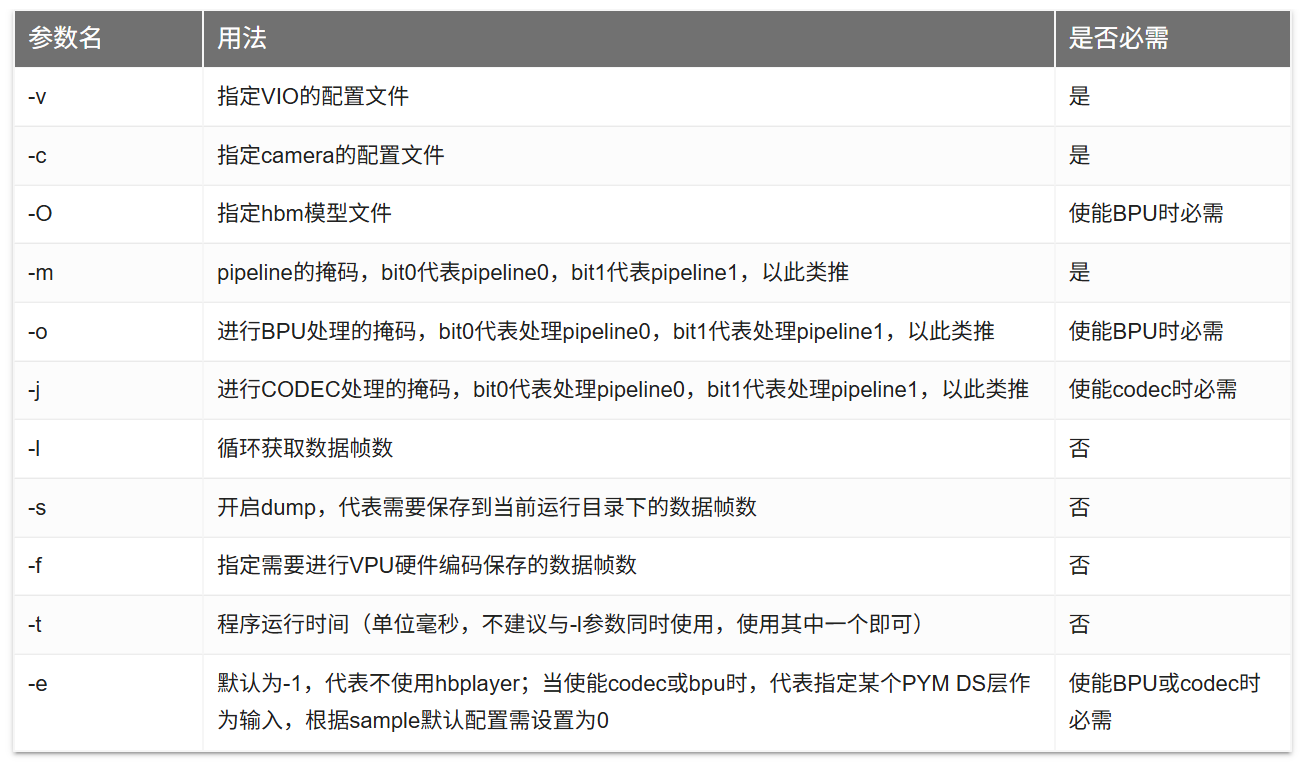
/app/sample/S83_Sample/S83E06_Tros/vio_full_link_sample/bin/vio_full_link_sample \
-v /app/sample/S83_Sample/S83E06_Tros/vio_full_link_sample/cfg/Scenario_1V_cpe0_sen_cim0_isp0_pym0_mode2_sample/vpm_config.json \
-c /app/sample/S83_Sample/S83E06_Tros/vio_full_link_sample/cfg/case_matrix/1V_OVX8B_RX0/hb_j6dev.json \
-O /app/sample/S83_Sample/S83E06_Tros/vio_full_link_sample/res/fcos.hbm -m 1 -o 1 -j 1 -l 1000 -s 10 -f 100 -e 0
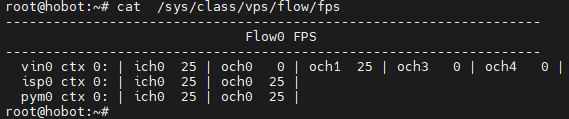
3.4.3. 運行結果說明
cat /sys/class/vps/flow/fps
成功加載 hbm 模型:
root@hobot:~# bash /app/sample/S83_Sample/S83E06_Tros/vio_full_link_sample/bin/run_vio_full_link_sample_4V.sh
[DNN] HBTL_EXT_DNN log level:3
[UCP]: log level = 3[UCP]: UCP version = 3.0.6
[VP]: log level = 3[DNN]: log level = 3[HPL]: log level = 3[UCPT]: log level = 6[INFO] model is: /app/sample/S83_Sample/S83E06_Tros/vio_full_link_sample/res/fcos.hbm
[BPU][[BPU_MONITOR]][281472801308704][INFO]BPULib verison(2, 0, 5)[]!
[DNN]: 3.0.6_(4.0.19 HBRT)[INFO] Load model successfully!
start_hbplayer_thread start success. pid 281472495382208
create_socket_listen---177, listern 0xffff640154c0
create a listener, port is 10086
create_socket_event---202, t_base 0xaaab0d353e60 event base is 0xffff64014750, listener 0xffff640154c0
[15:07:04]start_callback_service[538] hbplayer L: start_dump_server_thread start success.

[INFO] pym: hb_vio_start_pipeline done[DBG] pym: pipe(0)Test vio work thread---running.
[DBG] pym: pipe(0) pym feedback worker_thread Ready !
[INFO] pym: hb_vio_start_pipeline done[DBG] pym: pipe(1)Test vio work thread---running.
[DBG] pym: pipe(1) pym feedback worker_thread Ready !
[INFO] pym: hb_vio_start_pipeline done[DBG] pym: pipe(2)Test vio work thread---running.
[DBG] pym: pipe(2) pym feedback worker_thread Ready !
[INFO] pym: hb_vio_start_pipeline done[DBG] pym: pipe(3)Test vio work thread---running.
[DBG] pym: pipe(3) pym feedback worker_thread Ready !
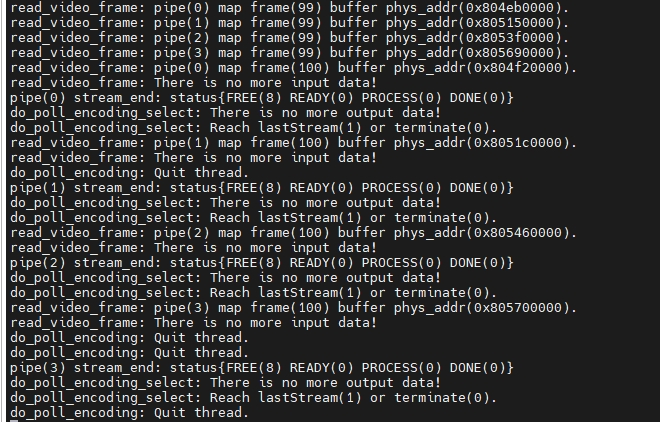
Dump、CODEC 編碼:
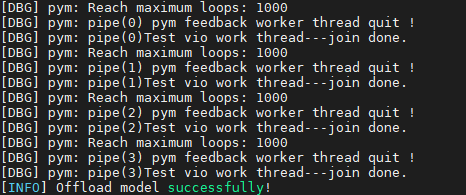
運行結束正常退出:
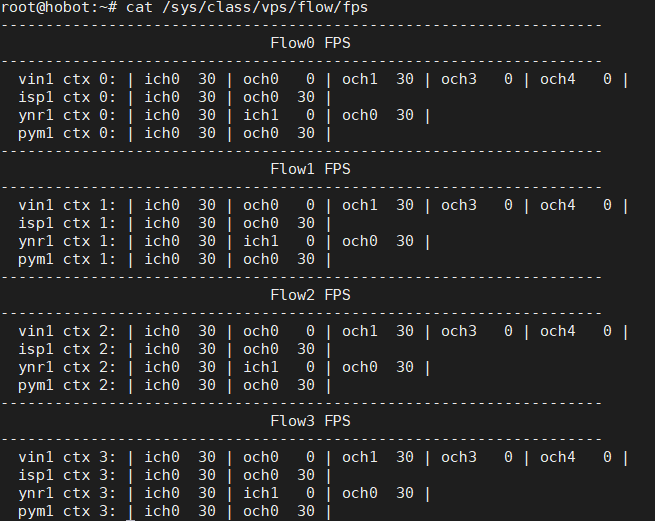
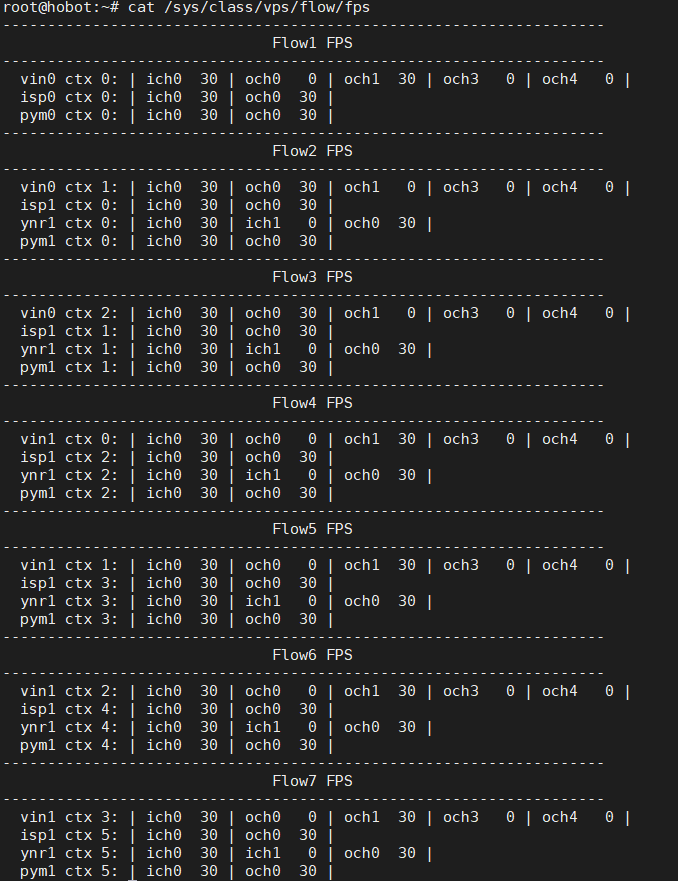
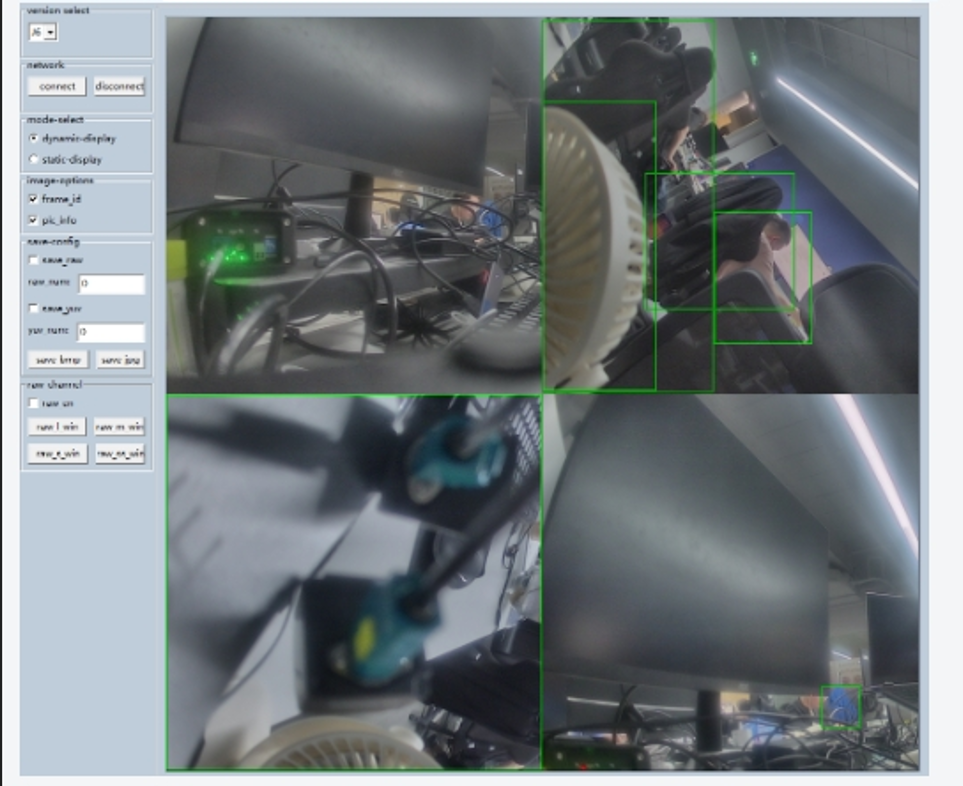
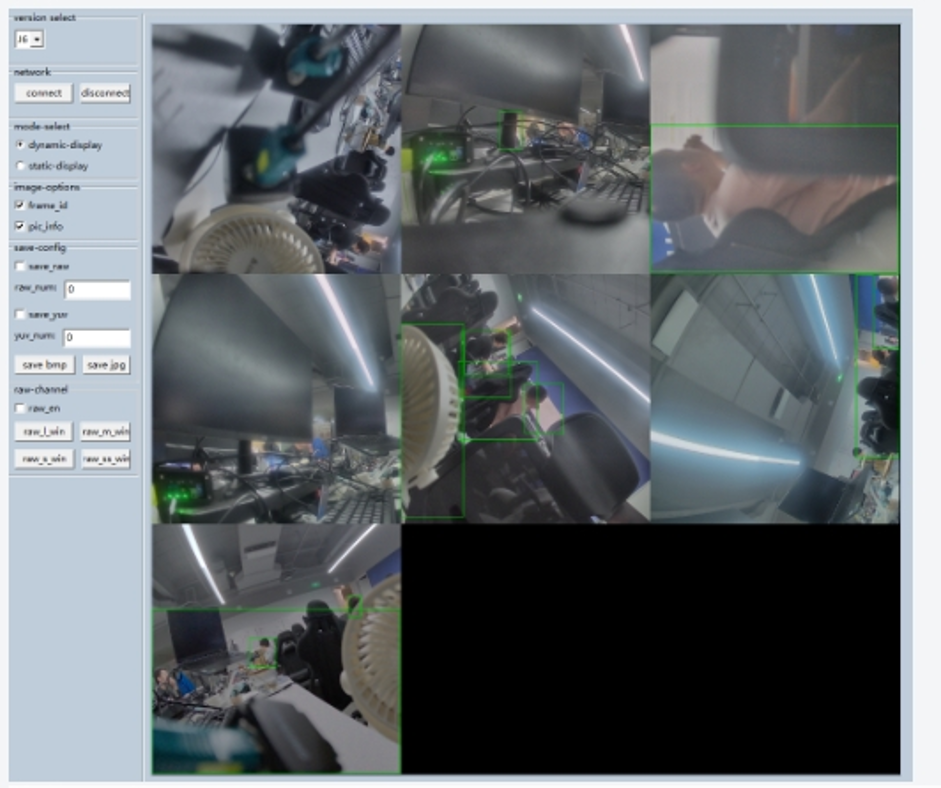
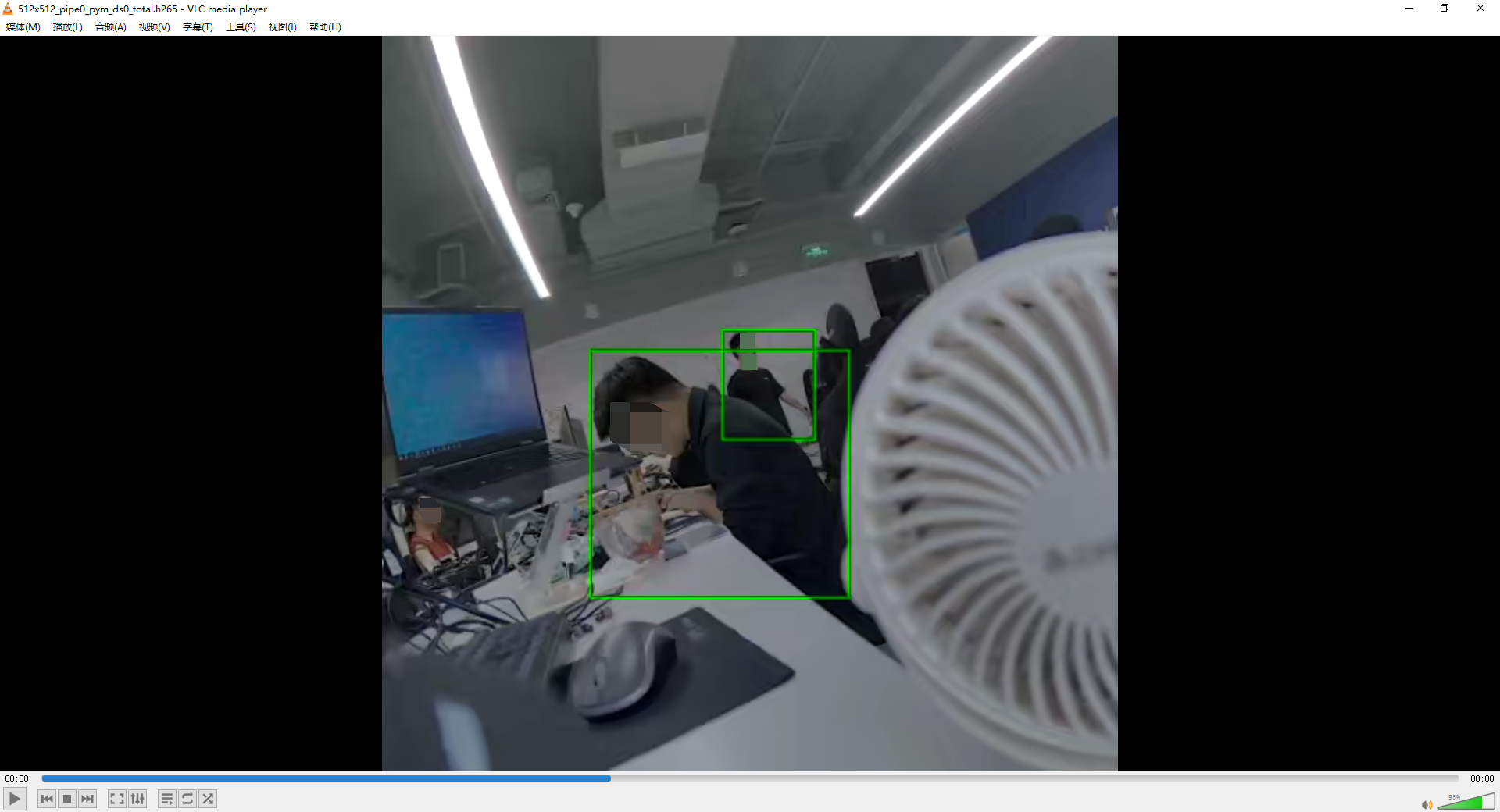
3.4.4. 看圖結果
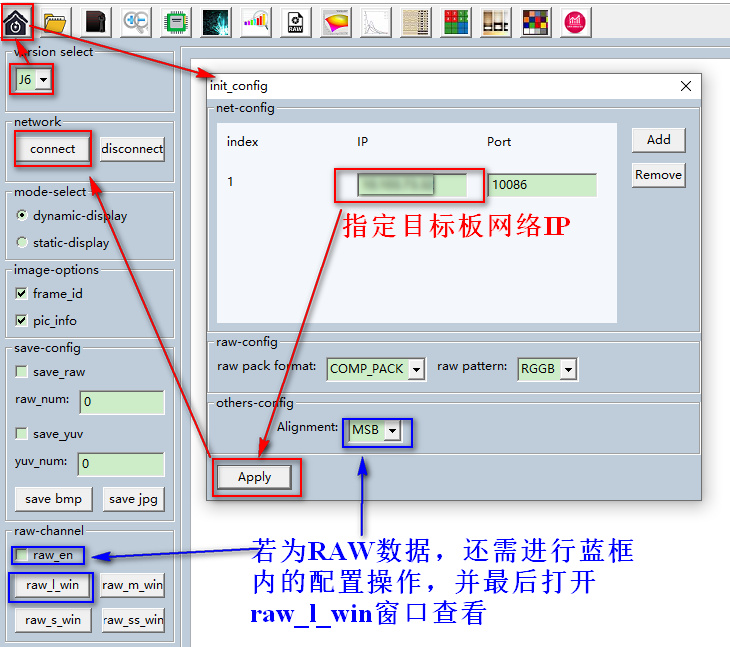
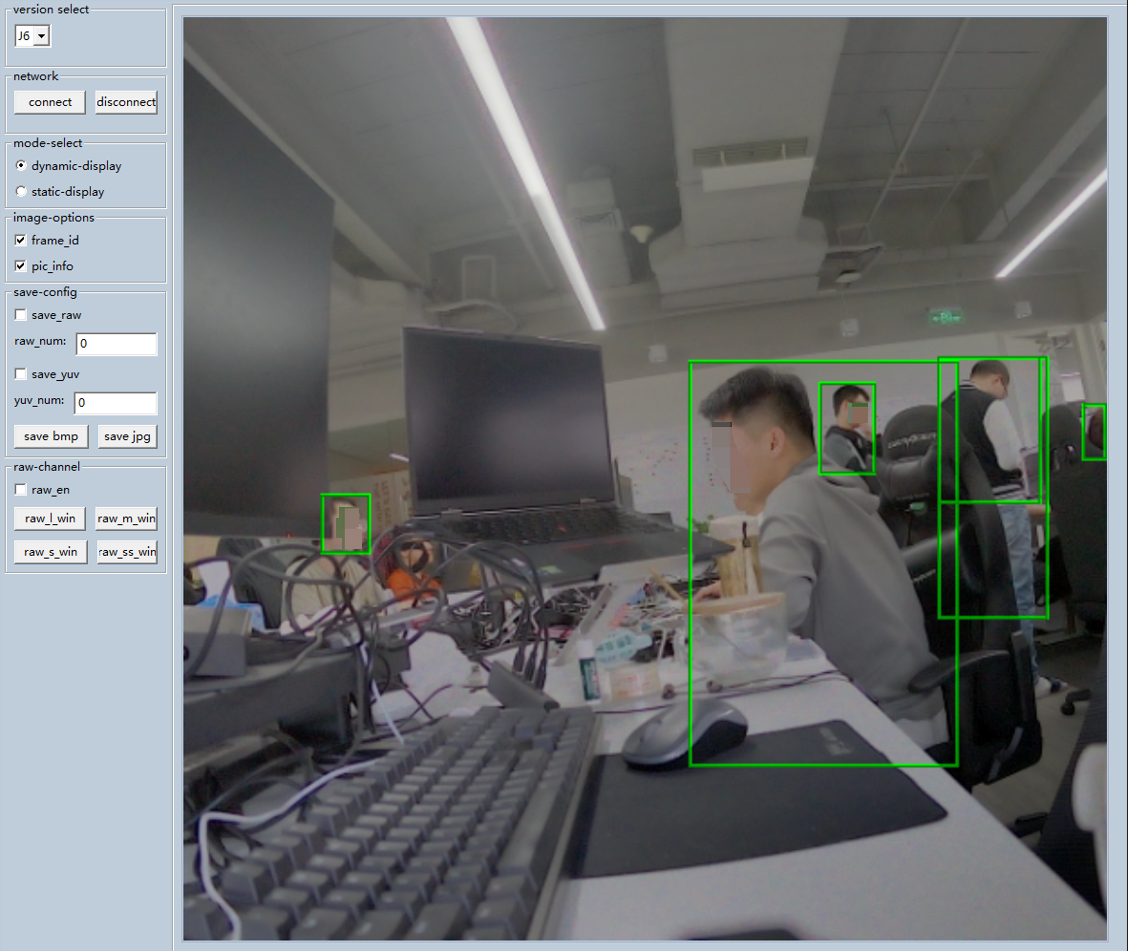

*博客內容為網友個人發布,僅代表博主個人觀點,如有侵權請聯系工作人員刪除。